Your Starting Point

Start Where You Are. Grow Into What You Need.

Whether your team has no playbook, a Word document playbook, or enterprise-grade standards - ContractKen meets you there.

📚
Use Our Playbooks
For teams without formal standards
Start reviewing contracts immediately using ContractKen's pre-built playbooks, drafted by experienced attorneys, not Claude.
  • Pre-built for common contract types (NDA, MSA, SaaS, Employment, and more)
  • Preferred, fallback, and walkaway positions pre-configured
  • Guidance notes explain the reasoning behind each standard
  • Step-change improvement over reviewing with no playbook at all
Start reviewing on Day 1 →
🏗
Customize Pre-Built
For teams that want a head start
Start from a pre-built playbook template and customize it to match your firm's specific positions. Best of both worlds - speed of pre-built, precision of custom.
  • Choose a pre-built template for your contract type
  • Modify positions to match your firm's risk appetite
  • Add custom clauses and guidance notes
  • Deploy to your team - updates apply instantly
Customize a template →

Once Built, Playbooks Enforce Themselves

You define the standard once. The AI applies it to every contract, every reviewer, every time.

1
Open Contract
Any third-party contract in Word
2
Playbook Applied
AI checks every clause against your positions
3
Deviations Flagged
Severity ranked: below preferred, fallback, or walkaway
4
Redlines Suggested
Corrections from your clause library, applied as tracked changes
Example Playbook Rule: Limitation of Liability SaaS Agreement Playbook
Clause Type
Limitation of Liability - Aggregate Cap
Preferred
Vendor-only cap at 2x annual fees, with uncapped carve-outs for IP infringement, indemnification, and willful misconduct
Fallback
Vendor-only cap at 1.5x annual fees, carve-outs for indemnification and willful misconduct only
Walkaway
Mutual cap at 1x annual fees, willful misconduct carve-out only. Below this = escalate to partner.

Guidance note: Always push for vendor-only cap first. Mutual caps at 1x are our floor - if counterparty won't accept, flag for partner review. The IP carve-out is commercially critical for software deals; concede it only as a last resort.
Customizable Playbooks and Standards

Customizable Playbooks and Standards

ContractKen allows users can quickly encode their own checklist or standards into the AI, without needing an IT expert. ​The ability to bring your own playbook: e.g., upload or define your company’s negotiation rules, and the AI will apply them consistently when reviewing a contract​.

Did the counterparty sneak in an unusual liability clause that violates your playbook? ContractKen will spot it and either suggest deleting it or replacing it with your pre-approved wording.

For teams that don’t have extensive playbooks yet, ContractKen offers well-researched industry-standard playbooks out-of-the-box (drawn from best practices) to ensure even smaller legal teams can enforce consistency from Day 1. This playbook-driven review guarantees that every contract your team touches is evaluated against the same quality benchmark - no more missed issues or inconsistent positions.  
AI Powered Suggestions & Redlines

AI Powered Suggestions & Redlines

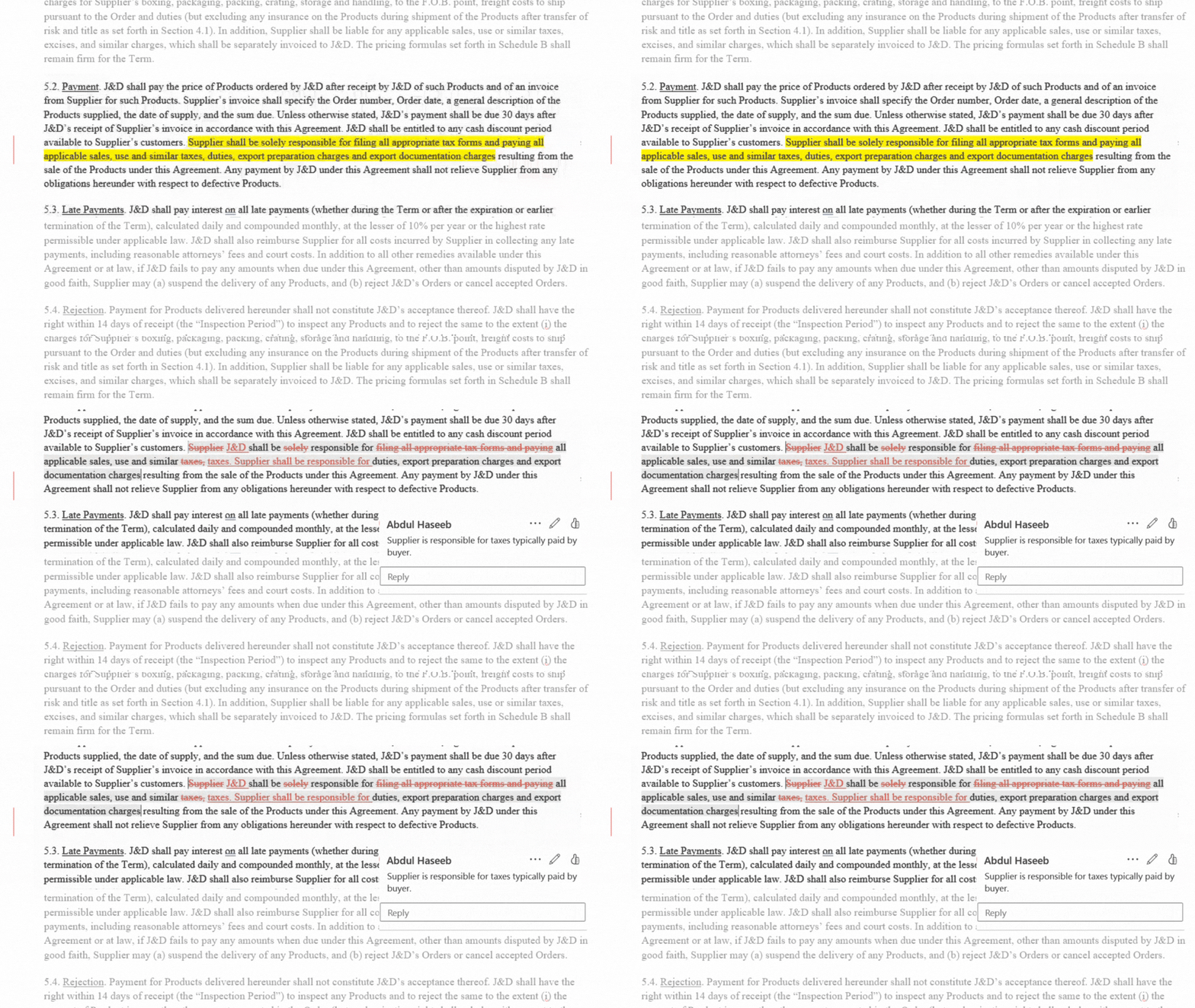
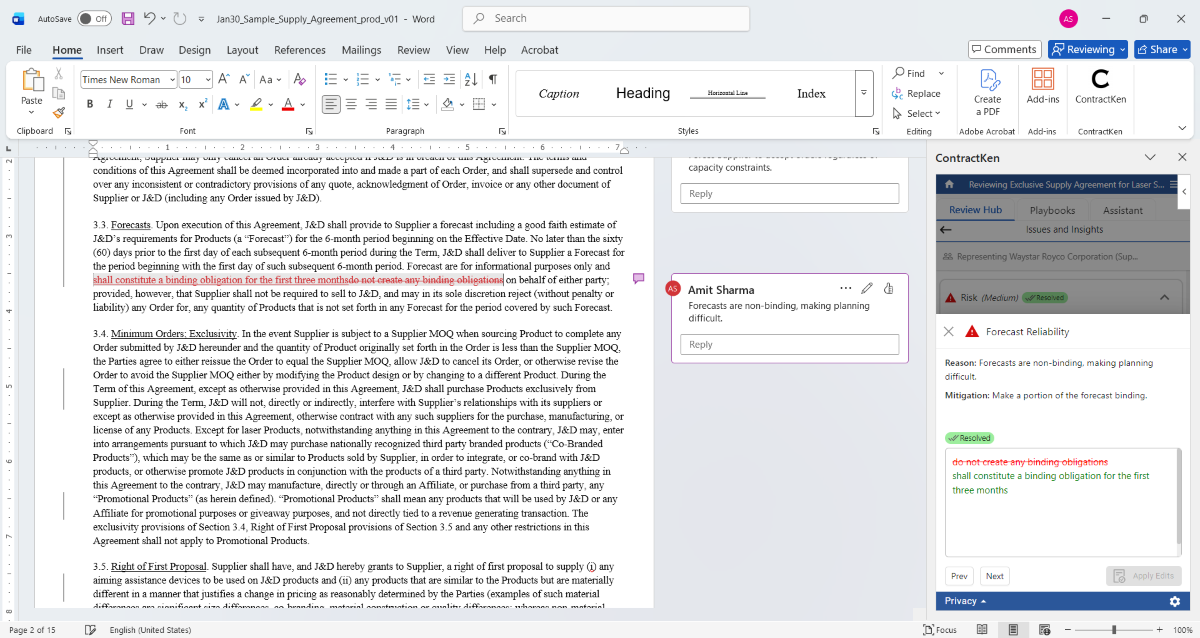
ContractKen use AI to redline edits for risky terms or deviations from the playbook, highlighting changes that attorneys can then accept or reject​. As the AI proposes changes, they appear as tracked edits in Word or as comments - nothing is automatically "finalized" without your say-so. The lawyer remains the final arbiter on every change​. In practice, this means the AI might generate a revised indemnification clause per your playbook’s preferences; you can then review that suggestion, perhaps see a comment explaining it, and choose to accept or tweak it.

This collaborative stance ensures transparency: you see exactly what the AI is doing and why.
Commenting & In-Document Guidance

Commenting & In-Document Guidance

Beyond redlining text, ContractKen inserts explanatory comments or annotations. This is akin to having an expert editor reviewing your contract and leaving notes. By embedding the “why” behind a change (e.g., “This indemnity clause is non-standard; consider adding X for better protection”), the AI helps lawyers and their teams make informed decisions.

It also facilitates active collaboration - team members can reply to these comments, discuss them, or use them as a basis for internal approval, all within the document. The ability to instantly see an alternative wording for a clause (or a flagged problematic term with a recommendation to fix it) can cut drafting and review time dramatically.
Clause Libraries and Precedents Integration

Clause Libraries and Precedents Integration

Tired of hunting through old documents for that perfect clause you wrote last year? ContractKen comes with an integrated Clause Library of 700+ curated clauses covering common commercial contracting scenarios​

Need a non-solicitation clause that aligns with your playbook? Simply search the library from within Word and drop it into your draft. The AI can also suggest clauses from this library as you work. For example, if your playbook says every SaaS agreement should include a data privacy clause, and your draft is missing one, ContractKen might recommend inserting a clause from the library and tailor it to the context. By blending AI with a rich knowledge base, ContractKen helps you draft contracts up to 2x faster without sacrificing quality​.
Active Collaboration Features

Active Collaboration Features

Because ContractKen operates in Word, it naturally supports the collaboration features lawyers rely on. Multiple team members can review a ContractKen-assisted markup, add their own comments, or adjust the AI’s suggestions.

All changes are tracked just as if a human made them, facilitating internal discussions (for law firms, that could be partner review of an associate’s draft; for in-house, it could be legal reviewing procurement’s redlines).
Seamless Word Integration

Seamless Word Integration

Works Where Lawyers Work: ContractKen lives inside Word as an easy-to-use add-in, meaning you can review, redline, and draft contracts in the same Word document you’ve always used. There’s no new interface to learn; if you know how to turn on Track Changes and insert comments in Word, you can use ContractKen’s AI suggestions.

This is ContractKen’s philosophy: amplifying lawyers’ expertise while simplifying the use of AI in contracts
Benchmarking and Analytics

Benchmarking and Analytics

A newer innovation is the use of contract analytics and benchmarking in the playbook workflow. Data can tell you how a clause in your draft compares to what’s typical in the industry​.This insight is incredibly valuable during negotiations  it provides leverage by showing if a position is one-sided or unusual.

Additionally, analytics dashboards can track common deviations, clause fallback patterns, and negotiation trends across deals. This data helps legal teams continuously improve their playbooks and demonstrate the value of the AI tool (for example, showing that 80% of incoming vendor contracts had an unacceptable termination clause which the AI flagged each time).